
However, I was not quite able to leverage the parallel execution capabilities that Azure Durable Functions offers. This was through no fault of the technology itself. The problem was the massive token count generated by sending large, pre-loaded queries to Bing, which in turn produced very long summaries. When attempting to run these tasks in parallel, I repeatedly hit the Tokens Per Minute (TPM) limit.
That being said, I was not quite able to take advantage of the running in parallel functionality that Azure Durable Functions offers. This was through no fault of it's own. The problem was the token count that was generated by sending large pre-loaded queries to Bing which, in turn, generated some very long summaries. When trying to run in parallel, I kept hitting the limit on Tokens Per Minute (TPM).
After some trial and error, I settled on a sequential, one-by-one approach. I configured the Durable Functions orchestrator to process the prompts one at a time, introducing a 60-second delay between runs. This solved my issue completely. It works perfectly for my use case since I do not have a massive volume of prompts to process. To illustrate how easy it is to approach those limits, each individual prompt still takes under 60 seconds to complete (averaging around 40 seconds).
For those struggling to run Durable Functions in parallel without hitting TPM errors, here are a few strategies you can try to lighten the token load:
Shorten XML Tags:
Pre-loaded prompts work best when the data is wrapped in XML tags that clearly describe your data structure. If you generate these tags dynamically on the fly, they can easily become unnecessarily bloated.
For example, a dynamically generated structure might look like this:
<Book_Information>
    <Book_Title_Alice_in_Wonderland>Alice in Wonderland</Book_Title_Alice_in_Wonderland>
    <Book_Title_Alice_in_Wonderland_Author>Lewis Carroll</Book_Title_Alice_in_Wonderland_Author>
    <Book_Title_Alice_in_Wonderland_Chapters>12</Book_Title_Alice_in_Wonderland_Chapters>
</Book_Information>
You can save a significant number of tokens by designing and enforcing a more concise XML schema:
<Book>
    <Title>Alice in Wonderland</Title>
    <Author>Lewis Carroll</Author>
    <Chapters>12</Chapters>
</Book>
While it requires a little extra work up front to set up a clean formatting schema, the token savings quickly add up.
Adjust the Reasoning Effort Setting
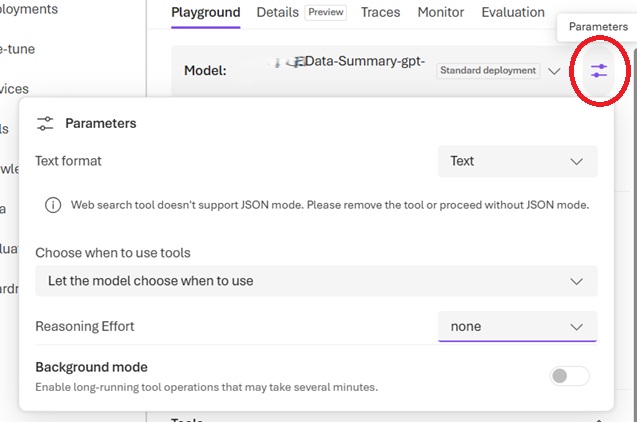
Check the Reasoning Effort setting in your agent. You can find it by clicking the Parameters menu icon to the right of your Agent Name (circled in red below). Consider setting this to "None" or "Low" to reduce secondary token consumption during generation. You can read more about how this impacts your workflow at the link provided below.
Truncate Data Selection and Remove Duplicates
If possible, remove data fields and tags that are less important to the prompt's context. You can also significantly reduce token usage by eliminating duplicate words. For example, if your book title is "Alice in Wonderland," you do not need to repeat it across multiple related data rows or tags. The model retains context and will know which book you are referencing.
Batches of Batches (Nested Orchestration)
If your parallel functions are close to completing before hitting the TPM restriction, you can try breaking your items into multiple smaller batches. You can then run a nested orchestration where you loop through these batches, executing the parallel functions within each batch. Spacing the batch executions a few minutes apart should give the TPM counter time to reset and allow the tasks to complete. If you need faster processing than a strict one-by-one approach, this strategy can safely speed up your pipeline.
Personally, I may take another run at this in the future, but for what I need right now, I have no complaints. Implementing the optimization strategies mentioned above definitely made my orchestration faster. Will I ever be able to fit the entire workload inside the TPM limit? I just might.