Years of programming experience definitely help. I am able to accurately explain exactly what I am looking for.
As I have noted before in the short time this blog has existed, code review is non-negotiable. Copilot will occasionally approach a problem differently than I would. Other times it makes outright mistakes - though some of those errors stem from prompt comprehension issues rather than true artificial "brain-farts." Review is simply a mandatory part of the process. That is just the way it is.
I recently completed a complex, orchestrated in-context RAG (Retrieval-Augmented Generation) feature that generates text summaries derived from a pre-loaded prompt and a live web search. This particular feature took advantage of a technology I had never used before: Azure Durable Functions acting as an extension of standard Azure Functions.
Naturally, this was the perfect opportunity to pay the premium and let Copilot draft the Durable Functions orchestrator. Following careful instructions on what I wanted to accomplish, I had a compiling project in no time. After a few hours of back-and-forth refinement, I had a working solution.
Once it was thoroughly tested over a couple of days, it was time to commit it to a repository. As a first step, I began to carefully inspect the code line by line, looking for oddities. As usual, I found a few.
Function Erroneously Added to Orchestration
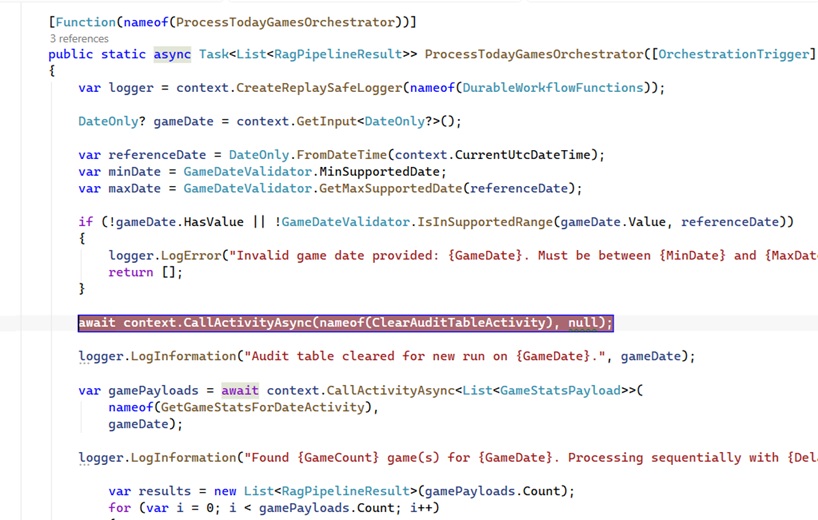
Below is a screenshot of the process that begins the Durable Functions orchestration. The function was working just fine, but there was a glaring mistake that needed to be corrected.
In red, you can see the async call for ClearAuditTableActivity. This activity functions exactly as it sounds - the results of the RAG output are saved to a temporary database table for auditing purposes. However, clearing the table at this specific point in the orchestration was a logical error.
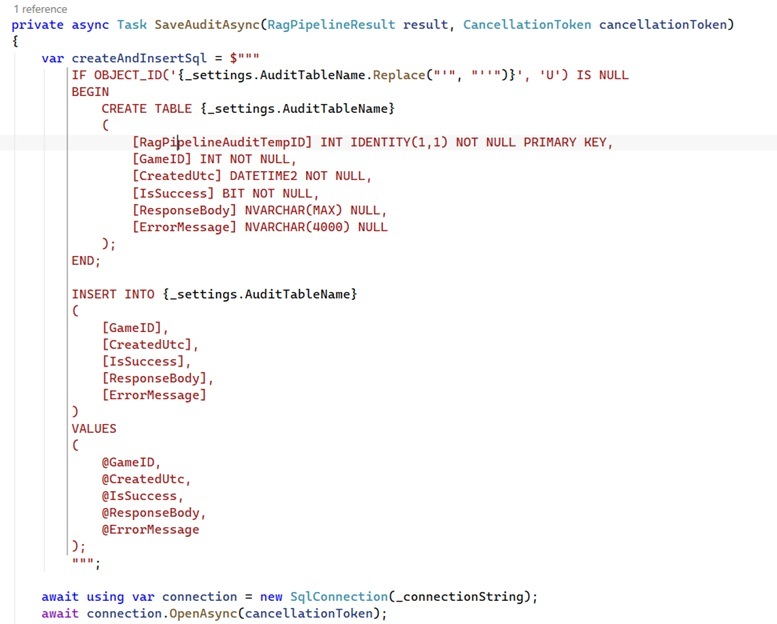
Necessary, but Unnecessary Table Creation
Given that I was adding a new audit table, I naturally expected to script this directly into my SQL database during the project setup phase. Instead, Copilot embedded a "Create Table" script inside one of my runtime processes. While it was helpful that Copilot recognized the need for the table, verifying its existence every single time the application runs is highly inefficient. It wasn't the worst mistake, but I removed the statement from the application code and created a dedicated SQL script to deploy the new table to production.
Odd Parameter Command
This next find was a bit surprising. I was not even aware that the AddWithValue method existed. Throughout my career, I have only ever used Add, specifically paired with a strictly defined data type. AddWithValue is exactly what it sounds like - it essentially tells the system, "Here is a parameter, see if you can guess its type."
Why leave it to guesswork? Nothing in this application suggests we should be injecting parameters without explicitly declaring their data types. Leaving it untyped can also lead to performance hits or implicit conversion issues in SQL. Naturally, I refactored it to use explicit typing:
command.Parameters.Add("@GameDate", SqlDbType.Date).Value = gameDate;

I am fully onboard with Copilot. That stance is unlikely to change, but I will not be overusing it either. While AI tools can drastically speed up project timelines and shorten the learning curve for new technologies, human review remains absolutely essential. You must always inspect the output.