It's been a long time coming and something that required much research and testing before I could even get truly started. I have built an agent in Microsoft Foundry and I have successfully created a RAG pipeline.
My RAG pipeline is an in-context RAG pipeline where I am setting a pre-defined prompt and using Web Search (formally known as "Grounded with Bing") to combine the data I have provided with a Web search for a deep text-analysis of a sporting event.
The analysis is prior-to the game starting. The entire RAG solution, which I am working very eagerly on, is an orchestrated process: SQL stored procedure orchestration and Azure Durable Functions orchestration to finally call Azure Functions to create a summary analysis of the upcoming game. The result will be stored in markup files in Azure Blob Storage since I only need to run the model request once per day.
A RAG system like this is defined as "in-context" because it does not rely on a vector search or permanent vector databases. Instead of attaching static data sources to the agent - such as file groups or existing databases - I am providing that content directly in the API payload.
Instructions
This is a good area to be using Gemini, Claude, GPT, etc... to find a sound set of commands. There were many things I did not consider when I first wrote my instructions.
• XML
If you are adding pre-defined data to your RAG request, you should wrap it in XML. In my case, that pre-defined data is coming from a SQL database and contains data fields but also descriptors. It is highly recommended you come up with an XML schema for your data
• Tone
There is no dedicated configuration setting for Tone with a RAG request. While you can inject what are known as "Structured Inputs" into your API calls or SDK, these are simply custom wildcard variables rather than hardcoded platform parameters. At the end of the day, you simply tell the model what kind of vibe you want directly within the prompt instructions. Here is an example of the instruction string I use for a sports data feature:
You must write directly to the general public (website visitors) in a clear, authoritative, and descriptive newspaper sports-page style.
• Site Restrictions
These are also handled entirely within your prompt instructions. Be sure to explicitly instruct the agent to exclude results from websites you do not want to display - such as social media platforms or competing sites that cover the same topic from an undesirable angle. For example, in my sports pipeline, I explicitly tell the model not to return any links or data from gambling sites.
• Perspective (I/We/Me/You)
You must explicitly instruct the agent to write for a general audience rather than assuming it is answering a question for an isolated user. For example, injecting a rule like, "Never address the founders, site owners, or the user directly," is vital. Without setting this boundary, the model will slide into an informal, one-on-one conversational tone.
Reasoning Effort
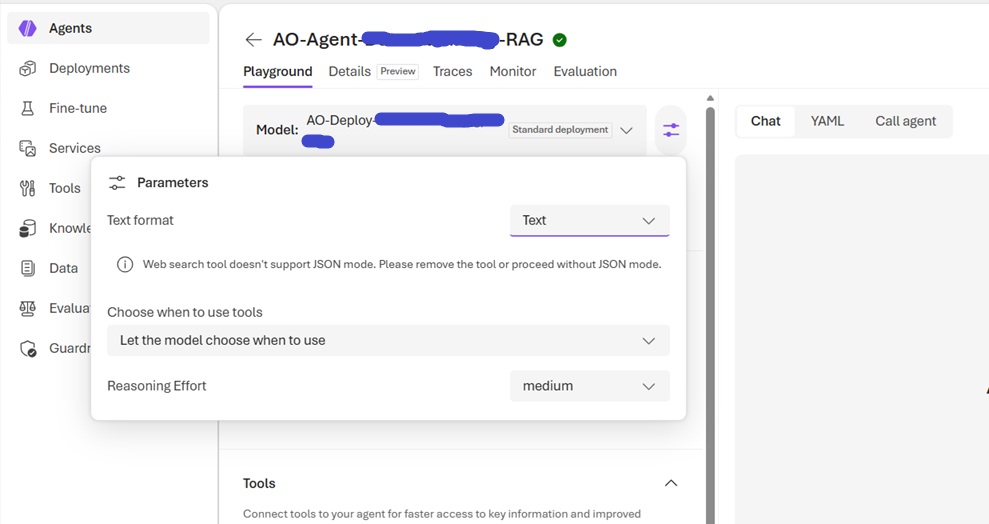
With certain RAG requests, you are not given options for Temperature or TopP. Instead, Microsoft Foundry presents you with a "Reasoning Effort" setting. Reasoning Effort dictates how many thinking tokens the model will use per request. A higher thinking token setting triggers the model to run internal pre-queries to verify information and double-check its results before they are delivered to you.
The parameter can be set to Low, Medium, or High. As you can imagine, the higher you set it, the more tokens you use and the longer the RAG request takes to process. My In-Context RAG inputs are large; between input and output, I use around 20k tokens with a Reasoning Effort set to Medium. My requests are fairly quick at the Low setting (around 10 seconds) but slow down to roughly 5 minutes when changed to Medium. High will not complete unless I increase max_completion_tokens in the YAML file, and I have decided that is simply more power than I need.
The Reasoning Effort definitely made a difference when I moved it to Medium. The comprehension and quality of the summary were noticeably better than when set to Low, though Low was not terrible either. I haven't tested High yet. Right now, a 5-to-10-minute wait time isn't appealing, especially since I want to keep costs down.
Despite these RAG requests running on a periodic, orchestrated schedule where the output is stored, a lengthy processing delay can interfere with efficient orchestration and may cause issues with Azure Function timeouts down the road. While there are workarounds for those timeouts, they would require a higher-level, more expensive Azure Functions account. I may explore that later, but there is enough on the table right now.
Below is a screenshot of the Reasoning Effort setting in the Microsoft Foundry playground.
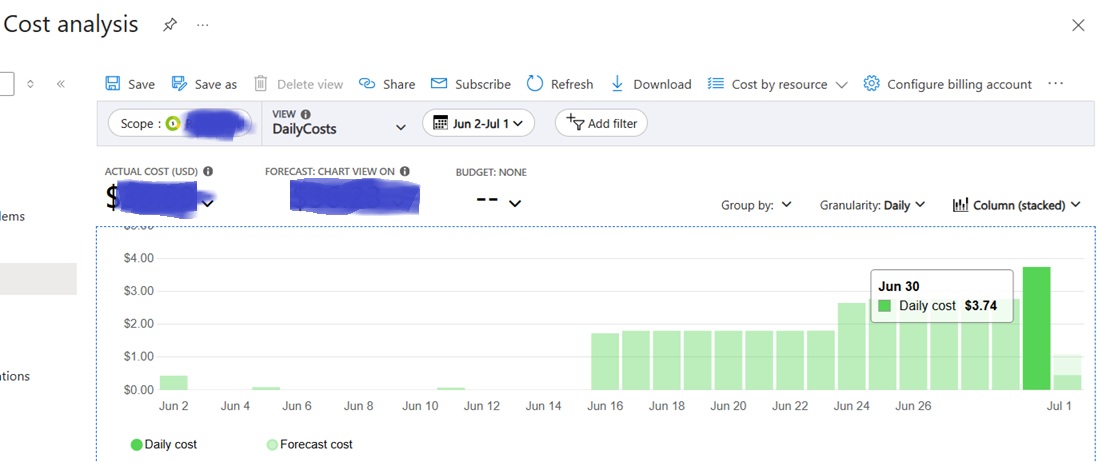
In terms of cost, my RAG requests are quite large, consuming roughly 20k tokens per request. On my first day, I ran about a dozen test requests while switching between the different Reasoning Effort settings. Compared to the day before, when I only ran a single site on App Service, I spent an additional $0.97. That is it. This completely bucks the popular trend that "AI is always expensive." Plus, the specific type of RAG requests I am making only need to run intermittently - and very intermittently at that.
One Agent for Multiple Sites
This one completely blew my mind: if you set up an automated RAG pipeline in the manner that I did, you can actually reuse a single agent across multiple distinct websites. You simply pass custom instructions and runtime parameters dynamically via code using API requests or the SDK. Furthermore, if you attach documents to your pipeline, you can explicitly instruct each request which specific file group - or vector store - to query. By isolating your files into site-specific vector stores, you completely prevent data contamination. It is worth pointing out that if you need to run the same core RAG features across multiple sites, you do not need to build, manage, or pay for a separate agent pipeline for each one.
You will just need a way to manage it all. In my case, I plan on building a standalone app - hosted on a private network or protected by a Microsoft Entra ID entity - where I can easily configure and save settings for each site. This will include custom instructions and any other variables that need to be dynamically passed into the API call or SDK at runtime. It's already in the works and I would expect a blog post on that soon.